How to use ZeroPercent
Your backup when your phone isn't. Set it up once, and if your phone ever dies, gets lost or is stolen, you can still reach the people you trust from any borrowed phone.
Two lists, and the same person can be on both
Your plan is who uses ZeroPercent with you: just you on Solo, two of you on Duo, up to six on Family. Everyone on your plan has the app or the web app. The adult(s) who run the plan see everyone's battery; everyone else sees their own.
Your backup contacts are who you would want to reach when your phone is gone: a relative, a friend, your boss, a neighbour. They don't need the app, an account or a subscription, and they don't have to be on your plan. Everyone on your plan keeps their own separate list. Everyone on your plan already counts as a backup contact, and you can all reach each other in a rescue (everyone agrees to that when they join), so you don't add them twice.
So your Duo partner or anyone in your family is already covered. If you'd rather one of them couldn't reach you, switch them off in the app under Settings, Rescue texts from your plan (in the web app, Who can reach you).
Think of your flatmate. If you're locked out with a dead phone, they're exactly who you need to reach, so they belong on your backup contacts. You probably don't want them watching your battery all day, though, so they don't belong on your plan. Your partner might be on both.
For families, kids and teens
- Set up your familySay one adult sets it up. They download ZeroPercent, pick My family and verify their number. That makes them the family's admin. A family can have up to six people. No iPhone in the house? They can do all of this in their phone's browser instead: sign in at zeropercentapp.com/me and tap Start a family. The code, the approvals and the code word all work there; only battery alerts need the app.
- Choose a code wordThe admin picks one word for the family. It goes in the message you send your backup contacts, and it's added to every rescue text, so they can recognise a real message from you. It isn't a password: it's a word they'll know.
- Invite your family to the planThese codes are for the people who'll use ZeroPercent themselves. You add the people you want to contact in a later step. The admin creates one code for the family. It looks like ABC-HGT (older ones look like ZERO-ABCD), and everybody can use the same one, so they send it to everyone rather than making one each. Whoever joins still waits for an admin to approve them, so a code on its own is not a way into your family. Another adult can be made an Admin, so either of you can approve people and manage the family. Children join as Member. If there's only one adult, just invite the children.
- They join, and an admin approvesEach person downloads the app, taps Join with an invite code, enters their code and verifies their number. Someone on Android opens the invite link in their browser instead and joins from there. The admin gets a notification, checks it's the right person, and taps Approve. If they run the family from their browser, they appear under Plan members awaiting approval at zeropercentapp.com/me, and we text them if someone has been waiting a day. Nobody sees the family until an admin has approved them. The card shows the last three digits of the number they verified and their age band, so you can check it's who you meant.
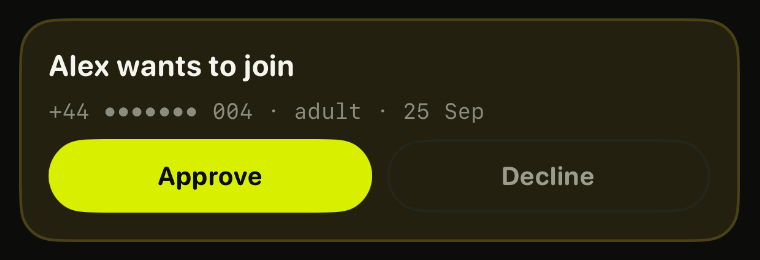
People tab, your plan - Each person adds their own backup contactsEveryone in the family can already reach each other in a rescue, so there's no need to add them. Each person adds anyone else they would want to reach if their phone died, and keeps their own list: a friend, a boss, a neighbour.
- Set your ZeroPercent PINChoose a 6-digit PIN you'll remember under stress, not your bank one. With your number and date of birth, it's how you sign in to the rescue website from a borrowed phone.
- Learn the rescue stepsYou don't contact anyone from the app in an emergency. You use the ZeroPercent rescue website, zeropercentapp.com, from a borrowed phone. The app walks you through exactly what that looks like, so you know what to do before you need it.
- Send each person a link, and wait for them to confirmThis step is the one that matters. From Your people, send each backup contact a link from your phone. They confirm once on our website, and that's it. Until they confirm, a rescue can't reach them. Your list shows who is ready and who still needs to confirm: Ready, Waiting for them to confirm, or Not sent yet. Nothing else is asked of them: no app, no account, no subscription.
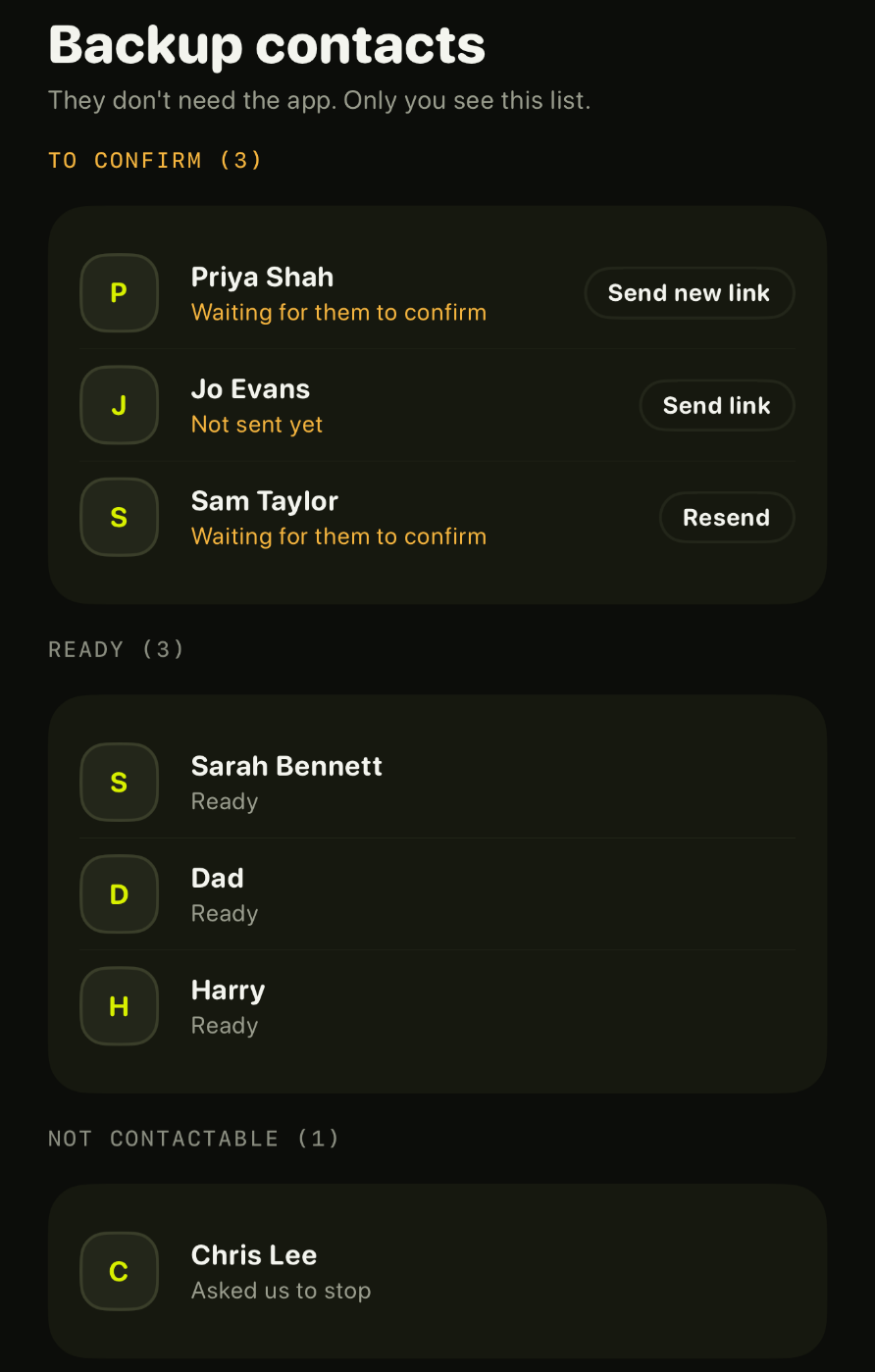
Your people, backup contacts
For a partner, a parent, a housemate
- Set up your DuoOne of you downloads ZeroPercent, picks Me and one other person and verifies your number. It's for a partner, a parent or a housemate: anyone you want to be able to reach if a phone dies.
- Invite the other person to your DuoThis adds them to your plan, so you can reach each other if a phone dies, and you'll see their battery. Send them the invite code, which looks like ABC-HGT (or ZERO-ABCD on older invites). They download the app, tap Join with an invite code and verify their number. You get a notification, tap Approve, and you're connected.
- Choose a code wordOne of you picks a word for the two of you. It goes in the message you send your backup contacts, and in every rescue text, so they can recognise a real message from you. The app asks for it on the Your people screen.
- Keep an eye on batteryWhoever runs the Duo sees the other's battery level and when it was last checked, plus whether they're set up and ready. To both see it, make each other admins in Settings. Never their location, their messages, or what they do in the app.
- Each of you adds your own backup contactsYou can already reach each other in a rescue, so you don't add your Duo partner. You each keep your own separate list of anyone else you'd want to reach if your phone died: friends, colleagues, neighbours.
- Set your PINChoose a 6-digit PIN you'll remember under stress, not your bank one. With your number and date of birth, it's how you sign in to the rescue website from a borrowed phone.
- Learn the rescue stepsYou don't contact anyone from the app in an emergency. You use the ZeroPercent rescue website, zeropercentapp.com, from a borrowed phone. The app walks you through exactly what that looks like, so you know what to do before you need it.
- Send each person a link, and wait for them to confirmThis step is the one that matters. From Your people, send each backup contact a link from your phone. They confirm once on our website, and that's it. Until they confirm, a rescue can't reach them. Your list shows who is ready and who still needs to confirm: Ready, Waiting for them to confirm, or Not sent yet. Nothing else is asked of them: no app, no account, no subscription.
Your people, backup contacts
For your own backup
- Set up just for youDownload ZeroPercent, pick Just me and verify your number. You're the only person on your plan, so there's nobody to invite, but you'll still add backup contacts, because they're who you'd actually be reaching. On Android, or an iPhone too old for the app, do the same in your browser at zeropercentapp.com/me: sign in with your number, say who you are, then tap Set up on my own. You don't need an invite code.
- Add your backup contactsThe people you'd want to reach if your phone died right now: a partner, a relative, a friend, your boss. They don't need the app or an account. One is enough to start.
- Choose a code wordPick a word your backup contacts will recognise. It goes in the message you send them, and in every rescue text, so they can tell a real message from you. The app asks for it on the Your people screen.
- Set your PINChoose a 6-digit PIN you'll remember under stress, not your bank one. With your number and date of birth, it's how you sign in to the rescue website from a borrowed phone.
- Learn the rescue stepsYou don't contact anyone from the app in an emergency. You use the ZeroPercent rescue website, zeropercentapp.com, from a borrowed phone. The app walks you through exactly what that looks like, so you know what to do before you need it.
- Send each person a link, and wait for them to confirmThis step is the one that matters. From Your people, send each backup contact a link from your phone. They confirm once on our website, and that's it. Until they confirm, a rescue can't reach them. Your list shows who is ready and who still needs to confirm: Ready, Waiting for them to confirm, or Not sent yet. Nothing else is asked of them: no app, no account, no subscription.
Your people, backup contacts - Want someone watching your battery?You can create a group from your home screen at any time and invite people then. You don't start again or make a new account. Your backup contacts and your PIN stay exactly as they are; a group is a separate thing that sits alongside them. Creating one costs nothing.
When your phone dies
- Borrow any phone, from anyone: a friend, a teacher, someone in a shop.
- Open zeropercentapp.com in its browser, then tap the bright yellow banner along the top. Nothing to install.
- Sign in with your number, your date of birth and your PIN.
- Pick one of your backup contacts and send a message. Their reply comes back on the same page.
- Sign out before you hand the phone back. The session also ends by itself after 15 minutes.
Guides for parents
- What if your teenager's phone dies when they need you?
- If their phone is lost or stolen, can your teenager still reach you?
What others can see
- The adult(s) who run your plan (on Duo, your partner if they are an admin) see your battery level, when it was last checked, whether you're set up and ready, how many backup contacts you have, and when you last used a rescue. They see the number of backup contacts, never who they are, and never who you contacted or what you said.
- On Solo, nobody sees any of it. There is no one on your plan. Your battery, your setup and your backup contacts are yours alone.
- Anyone in your family already counts as a backup contact and can reach you in a rescue, unless you switch them off under Rescue texts from your plan (Who can reach you in the web app). Members who don't run the plan can't see your battery, and nobody on the plan can see anyone else on your list.
- Your backup contacts see only what you send them in a rescue, in an ordinary text. They can't see your battery, your list, or anything else.
- Nobody sees your location, the messages on your phone, or what you do in the app. We don't collect any of it. The messages you send during a rescue are the one exception, and only because we have to pass them on and bring the replies back: they're held for that session and deleted shortly after it ends.
Questions
Where do I contact my people if my phone dies?
On the ZeroPercent rescue website, zeropercentapp.com, from any borrowed phone. Not in the app: the app is on the phone that died. Sign in with your number, date of birth and PIN, then reach your backup contacts from there.
What is the code word?
One word your backup contacts will recognise. They learn it from the message you send them, before anything goes wrong, and it's added to every rescue text afterwards, so a message carrying it is one they have reason to trust. If a text says it's from you but doesn't have the word, they should check with your family before doing anything it asks.
Set it before you send your introductions. If you choose it later, the people you've already introduced won't know it.
It isn't a password and it isn't proof: it's a familiar word that helps someone tell your real message from a stranger's.
In a family or Duo, an admin chooses one word for everyone. If you're using ZeroPercent on your own, you choose your own word from So they know it's you on the Your people screen.
Does someone have to be on my plan to be a backup contact?
No. Your backup contacts can be anyone aged 16 or over with a phone: a relative, a friend, a neighbour, your boss. They don't need the app, an account or a subscription. Someone under 16 can only be reached as a member of your family plan.
The one thing they do have to do is confirm once on our website, using the link you send them from your phone. Until they confirm, a rescue can't reach them. Your people shows who is ready and who still needs to confirm.
What if the 15 minutes runs out while I'm waiting for a reply?
Sign in again on the same borrowed phone and carry on. Signing in successfully doesn't count against anything: the limit on attempts only counts failed ones, and a successful sign-in clears them.
Which numbers do ZeroPercent texts come from?
Rescue texts come from ZeroPercent's official numbers:
- UK: 07460 069376
- US: (888) 479-9370
When you tell your backup contacts about ZeroPercent, ask them to save the number as "ZeroPercent". Then a rescue text shows up with a name they recognise, along with your code word.
A number can be faked, so seeing ours isn't proof on its own. That's what the code word, and the next question, are for.
How can my backup contacts check a text is really from ZeroPercent?
They can ring the number it came from, from the phone that got the text. A recording says we'll ring them back, and ends the call. Within a minute we ring that phone and tell them whether anyone used ZeroPercent to reach it in the last day, who it was, and the characters the real text asked them to reply with, so they can check it matches.
We ring back rather than answer straight away because the number someone calls from can be faked, and ringing back means only the real owner of that phone hears the answer. ZeroPercent will never ask anyone to send money. More on checking a text.
What happens if someone texts a ZeroPercent number?
Replies are only passed on while a rescue is happening, and only from the backup contacts that rescue messaged. Anything else is dropped and never stored.
I'm not joining a family, but it's asking me for an invite code
You don't need one. Invite codes are only for joining a plan someone else has already set up.
In the app, go back and pick Just me, or Family or Duo to start your own plan, instead of Join with an invite code.
In your browser, at zeropercentapp.com/me, sign in with your number and give your name and birth month. If you're 16 or over, the next screen offers Set up on my own under the code field. Tap that and carry on to your backup contacts and your PIN.
Under 16, ZeroPercent works through a family, so you do need a code: the adult(s) who run your family send it to you.
Nobody in our house has an iPhone. Can we still have a family?
Yes. Someone 16 or over signs in at zeropercentapp.com/me and taps Start a family. They get one code to send everyone, and they approve each person who uses it, all in the browser. Everyone else joins with that code, also in their browser.
The one thing that needs the app is battery alerts, because a browser can't see your battery. The rescue itself works the same.
Why does an admin approve everyone who joins?
Invite codes aren't tied to a phone number, so the approval step makes sure the right person is joining. Until an admin approves them, a new person can't see anyone in the family, and nobody can see them.
When do I get battery warnings, and whose battery?
Two different things, and both need notifications turned on.
Your own phone tries to warn you at 10% and 5%, so you can start a rescue while you still can.
Someone else on your plan: if you're an admin, you get a heads-up when a person in your family or your Duo runs low (first at 20%, 15% or 10%, which you set in Settings), and you're told if their phone goes quiet, has probably died, or is back on. Each alert has Call and Text buttons that open your own Phone and Messages apps, and you can turn the buttons off. Solo has nobody to be told about.
iOS shares battery in 5% steps. When a phone on your plan is on 30% or less and stops reporting, ZeroPercent asks it for a fresh reading every 10, 15 or 20 minutes (the admins choose), even in Low Power Mode, and an admin can tap Check now. That phone shows each check. This needs ZeroPercent 1.0.8 or later on an iPhone with notifications on. A phone that is off or out of signal can't answer, so the app always shows how recent a reading is.
Can I change my number or my PIN?
Yes, both, in the app. Changing your PIN there asks for your current one, and once you give it the new PIN is live: the rescue page takes it straight away and the old one stops. Nothing is held back, because knowing the old PIN is the proof.
You can also set a first PIN at zeropercentapp.com/me. That page has nowhere to type your current PIN, so changing an existing one there goes the slow way instead: it waits 24 hours, everyone on your list is told, and your old PIN keeps working until the new one lands. To change it now, use the app.
Changing your number is blocked for 24 hours after any PIN change, so a thief who changed the PIN could not move the account the same day.
I've forgotten my PIN
Nobody can look it up, including us: it is stored in a form that cannot be read back. In the app, choose a new one and tap "I've forgotten it". The new PIN takes effect after 24 hours, and you and the adults who run your family are told straight away, so a reset nobody asked for can be cancelled from any phone that is already signed in. Your old PIN carries on working for that day, in case it comes back to you. For two hours after the new PIN lands, the rescue page will still not accept it. Until then, a backup contact can still reach you the ordinary way, so tell them.
Still stuck?
Email [email protected].